Most organizations can't say with confidence what's actually running in their tech stack. The official inventory is out of date, the architecture diagram was accurate eighteen months ago, and shadow IT has been quietly accumulating the entire time. An enterprise digital twin closes that gap by modeling the environment continuously instead of documenting it periodically.
This piece covers what an enterprise digital twin actually is, how it's built, and what it surfaces once it's running against a real environment: shadow IT, dependency risk, redundant tool spend, and the drift between documentation and deployment.
What Is an Enterprise Digital Twin?
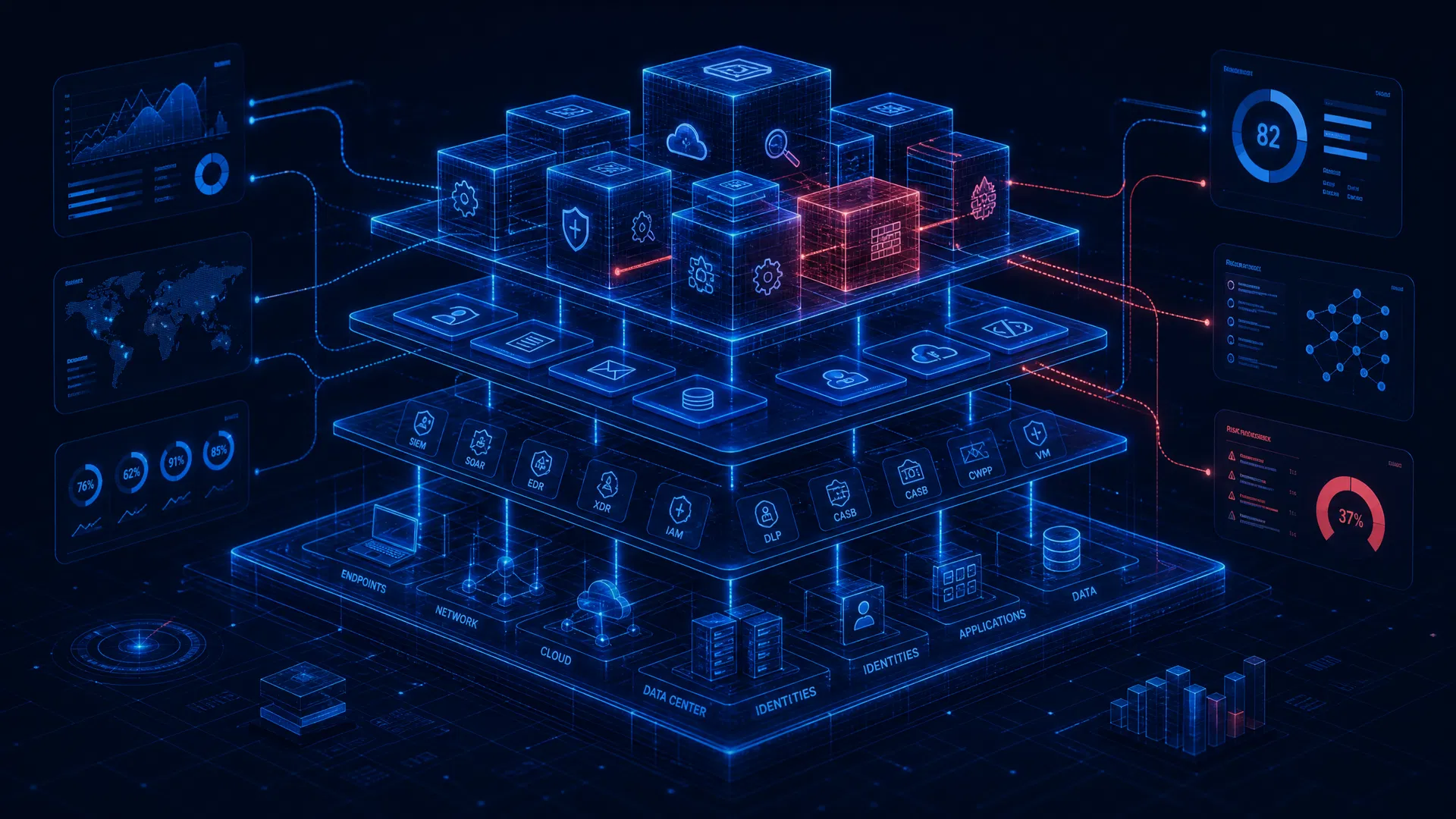
An enterprise digital twin is a living, queryable model of how an organization's systems actually run. Not a diagram someone updates twice a year. Not a wiki page that goes stale the week after it's published. It pulls data continuously from the real systems it represents, so what you're looking at reflects what's actually running today.
The core idea borrows from manufacturing, where digital twins have modeled physical equipment for years. The enterprise version applies the same pattern to a different kind of system: the applications, infrastructure, and dependencies that make up how a business actually operates.
Three things separate a real digital twin from a glorified spreadsheet or diagram:
- It's continuously synced. Data flows in from the actual systems, not from someone's manual update cycle.
- It's queryable. You can ask it specific questions and get an answer grounded in the current state, not go hunting through five different tools.
- It reflects reality, not intent. It shows what's actually deployed and connected, which is often different from what the documentation says should be there.
An enterprise digital twin models the technology and processes that keep a business running. It draws from cloud accounts, ITSM records, code repositories, and observability tools, and shows you what's connected to what, where the risk sits when something changes, and whether documentation and deployment have drifted apart.
What an Enterprise Digital Twin Actually Tells You
The definition is useful, but it's abstract until you see what it actually surfaces. In practice, four things show up almost immediately once a digital twin is running against a real environment.
Where Shadow IT Is Hiding
Every IT team has an official system inventory, but it doesn't offer a complete match of what's actually running.
Shadow IT accumulates in predictable ways: a marketing team expenses a SaaS tool without looping in procurement, a contractor spins up a test environment and leaves before tearing it down, a developer connects a personal API key to production because the sanctioned option was too slow to provision. None of it gets logged anywhere central, and each instance looks small in isolation. The aggregate is usually much larger than anyone expects.
A digital twin finds these systems differently than a manual audit does. Instead of relying on someone to self-report, it picks up activity from identity provider logs, network traffic, DNS resolution, and API authentication patterns, so a tool shows up because it's actively connecting and moving data, not because someone remembered to add it to a spreadsheet. That distinction matters: point-in-time audits catch what's active on the day of the audit, while a continuously synced twin catches what spins up in between.
What tends to surface first:
- SaaS tools purchased outside procurement, often duplicating something already licensed elsewhere
- Test or staging environments that were never decommissioned
- Personal cloud storage or file-sharing accounts holding business data
- Third-party integrations authenticated with individual employee credentials rather than service accounts
Each of these is a security and compliance exposure on its own. Together, they're usually the first concrete finding a team gets once a twin goes live, and often the one that makes the case for the rest of the rollout.
What Breaks If You Touch This System?
Dependencies build up in layers that rarely get documented as they happen. A service gets called by three others at launch. Two years later it's nine, some added by teams that have since reorganized or left. The original owner may not know about half of them.
This is where blast radius gets concrete. A change can ripple through direct dependents immediately, and through transitive dependents (systems depending on the systems that depend on it), in ways much harder to predict. A single schema change might break one service directly and three more indirectly, none of which show up in a change request unless someone happens to remember the chain.
Without a twin
blast radius lives in institutional knowledge, whoever's been around longest.
With a twin
a team queries the dependency chain directly, multiple hops out, before the change goes live rather than after it fails.
That shift matters most for the changes that are hardest to reverse: schema migrations, API deprecations, infrastructure consolidations.
Where You're Paying for Redundant Tools
Tool sprawl builds up gradually, through a few familiar patterns:
- Decentralized purchasing: different departments solve similar problems independently, each with its own vendor and contract
- Acquisitions: two companies merge, each bringing its own stack for the same function
- Turnover: a new team lead brings in a familiar tool rather than adopting what's already licensed
The redundancy rarely shows up on a billing statement. Two tools solving the same problem rarely share a name, vendor, or line item, so a spend audit looking for duplicate subscriptions misses overlap that doesn't look duplicate on paper.
A digital twin catches it because it maps what each tool is actually integrated with and used for, not just what it's called. Two project management tools connected to the same data sources and the same teams show up as functional duplicates even when nothing else about them matches. Once that's visible, consolidating stops being a multi-quarter discovery project and becomes a decision for the next renewal cycle.
What's Actually Running vs. What the Documentation Says
Documentation is accurate for exactly as long as it takes for the next change to happen.
Systems get patched, migrated, replaced, or quietly deprecated. The architecture diagram from eighteen months ago doesn't update itself, and the gap between documented and deployed widens without anyone deciding to let it happen.
That drift stays invisible until it matters, and it tends to surface at the worst possible times:
- A security audit, when the documented network topology doesn't match what's actually exposed
- An incident, when the runbook references a system decommissioned months earlier
- A migration, when a team discovers dependencies on something nobody knew was still running
- A due diligence process, when a buyer or auditor asks for an accurate system inventory and the one on file is months out of date
A digital twin closes the gap by reflecting current state automatically. It's less that it produces a better diagram once, and more that the diagram never gets the chance to go stale, which is exactly when accuracy matters most.
How an Enterprise Digital Twin Gets Built
None of what a digital twin surfaces works without a real data foundation underneath it. It's worth knowing what that actually looks like before evaluating any solution in this space.
- Cloud accounts and infrastructure. AWS, Azure, and GCP accounts are usually the first connection point, since most of an organization's compute, storage, and networking already lives there. This is also where a twin picks up resources that were spun up outside normal provisioning, the test environments and forgotten instances that never made it into anyone's inventory.
- ITSM and CMDB records. Existing tools like ServiceNow or Jira Service Management hold whatever inventory a team has already documented. A twin doesn't replace this data, it cross-references it against what's actually running, which is usually where the first discrepancies show up.
- Code repositories. GitHub, GitLab, and similar platforms show what's actually being built and deployed, including the dependencies and services defined in code that never made it into a diagram or a ticket.
- Observability and monitoring tools. Platforms like Datadog or New Relic contribute real-time signal: what's actually receiving traffic, what's calling what, and what's been silent long enough to be a candidate for decommissioning.
- Identity and access data. Okta, Azure AD, and similar providers show what's authenticating against what, which is often the fastest way to catch shadow IT and unofficial integrations before they show up anywhere else.
None of these sources is sufficient alone. A CMDB shows what's documented. Observability tools show what's active. Identity logs show what's connecting. A digital twin's value comes from pulling all of it into one continuously updated model instead of leaving a team to manually reconcile five different systems every time a question comes up.
Digital Twin vs. CMDB vs. Static Architecture Diagrams
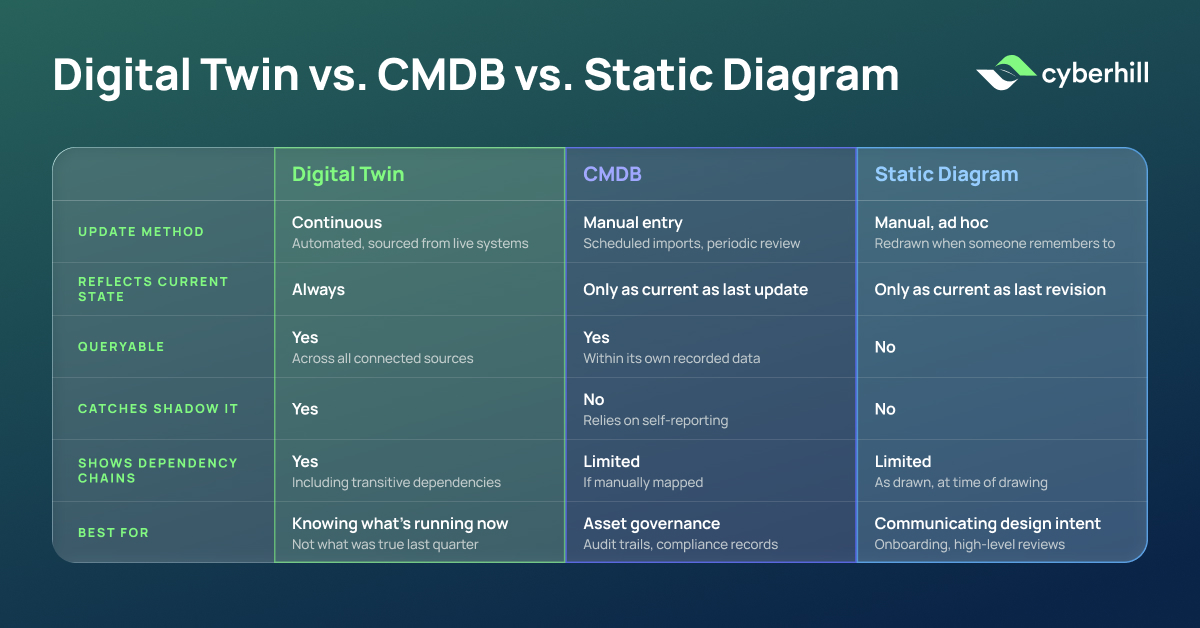
A CMDB (configuration management database) is a structured record of IT assets and their relationships. It's built for governance and change management, and it's only as accurate as the last time someone updated it. A static architecture diagram is a visual snapshot, useful for communicating a system's design at a point in time, but it starts going stale the moment something changes, and nothing forces a revision. A digital twin sits apart from both because it's continuously synced against the live environment rather than updated on a schedule or by request.
| CMDB | Static Diagram | Digital Twin | |
|---|---|---|---|
| Update method | Manual entry, scheduled imports | Manual, ad hoc | Continuous, automated |
| Reflects current state | Only as current as last update | Only as current as last revision | Always |
| Queryable | Yes, within its own data | No | Yes, across all connected sources |
| Catches shadow IT | No, relies on self-reporting | No | Yes |
| Shows dependency chains | Limited, if manually mapped | Limited, as drawn | Yes, including transitive dependencies |
| Best for | Asset governance, audit trails | Communicating design intent | Understanding what's actually running, right now |
None of this makes a CMDB or a diagram obsolete. A CMDB is still the system of record for governance and compliance. A diagram is still the fastest way to explain an architecture to someone new. What changes is where a team goes to answer the question that actually matters when something needs to happen quickly: what does this environment look like right now, not what did someone say it looked like the last time they updated the record.
Who Uses This Inside an Organization?
Different teams pull different things from the same digital twin, based on what they're actually responsible for.
- IT and infrastructure teams use it to validate change impact before a deployment goes out, and to close the gap between documented and actual state.
- Security teams use it to catch shadow IT and unmanaged integrations that never went through vetting, and to assess exposure before an audit instead of during one.
- Finance and procurement teams use it to identify redundant tool spend and build the case for consolidation at the next renewal cycle.
- Transformation and business leaders use it to understand what a proposed migration, integration, or acquisition will actually touch before committing budget to it.
This is part of why Wolverine, Cyberhill's AI-powered digital twin of an enterprise's tech stack, is organized around business function rather than industry vertical. IT gets a different view than security, which gets a different view than finance, all querying the same underlying model of the environment rather than five disconnected tools that each see a slice of it.
Find Out What's Actually Running Before It Costs You
The gap between what's documented and what's deployed doesn't close on its own. It widens every time a system changes and nobody updates the record, and it tends to surface at the worst possible moment: an audit, an incident, a migration that hits a dependency nobody knew existed.
An enterprise digital twin closes that gap by design, not by asking a team to keep up with documentation manually. It's the difference between finding out what's running in your environment during a postmortem and knowing it before you make the next change.
If you're weighing whether this is worth building into your own environment, the fastest way to find out is to see it against your actual stack rather than a demo environment. Book a Use Case Session to walk through what Wolverine would surface in yours.
See What's Running in Your Environment
Documentation tells you what should be there. A digital twin tells you what actually is.
Book a Use Case SessionWhat Is An Enterprise AI Digital Twin: Frequently Asked Questions
Do you need to replace your CMDB or ITSM tools to use a digital twin?
No. A digital twin doesn't replace a CMDB, it cross-references it. The CMDB stays the system of record for governance and change management, while the twin adds a continuously updated layer on top that shows where that record and reality have drifted apart.
How long does it take to stand up an enterprise digital twin?
This depends heavily on the size and fragmentation of the environment, and on how many source systems (cloud accounts, ITSM tools, identity providers) need to be connected. A single cloud environment with existing CMDB discipline connects faster than a sprawling, multi-cloud estate built up through acquisitions.
Does an enterprise digital twin require access to sensitive production data?
It requires read access to the systems it's modeling, cloud infrastructure, identity logs, code repositories, since that's what makes it accurate. It doesn't require write access to production systems themselves. The access footprint is worth scoping carefully with security during evaluation, since this varies by vendor and deployment model.
Is an enterprise digital twin only useful for large, complex organizations?
The value scales with complexity. A five-person startup with one cloud account and no shadow IT problem doesn't need one. Once an organization has multiple teams provisioning independently, several years of accumulated infrastructure, or a history of mergers and acquisitions, the gap between documented and actual state tends to be large enough that a twin pays for itself quickly.
How is an enterprise digital twin different from an attack surface management tool?
Attack surface management tools focus specifically on identifying external-facing vulnerabilities and exposure for security purposes. An enterprise digital twin covers broader ground, dependency mapping, tool redundancy, documentation drift, alongside shadow IT detection, so security exposure is one output among several rather than the entire purpose.
Does maintaining a digital twin require dedicated engineering resources?
Ongoing maintenance is lighter than maintaining a CMDB or architecture diagrams manually, since the twin updates itself from connected sources rather than requiring someone to log changes. Initial setup and source integration typically does require IT or platform engineering involvement, and that lift varies by how many systems need to be connected.